
Meow Bot
⭐ OriginalThe original Discord meow counter. Tracks every meow your community says, runs competitive leaderboards, and brings anonymous confessions, polls, and reaction roles — all completely free.
🐱 What is Meow Bot?
Meow Bot is a free Discord bot built for cat-loving communities. It started as a simple meow counter and grew into a full-featured community bot used by hundreds of servers.
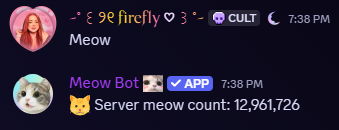
Every time someone types "meow" in your server, Meow Bot reacts with 🐱, posts the running server meow count in the channel, and adds it to the member's personal tally. Over time this builds into a real leaderboard your members can check any time. The bot also tracks bark and woof counts — reacting 😾 and posting a hissed response to those.
Beyond counting, Meow Bot handles anonymous confessions with optional admin logging, timed polls with exclusive voting, reaction roles with whitelist gating, and customisable welcome messages. All of it runs through Discord slash commands — there's no dashboard to set up.
⚡ Getting Started
Meow Bot starts counting meows the moment you add it. Run /setup to configure the optional features like confessions and welcome messages.
Add Meow Bot to your server
Click "Add to Server" above and authorise it through Discord's permission flow. The bot needs View Channel, Send Messages, Embed Links, and Add Reactions in any channel you want it to monitor.
Confirm it's working
Type "meow" in any channel the bot can see. It should react with 🐱 within a second or two. If it doesn't, check that it has Add Reactions permission in that specific channel.
Configure optional features with /setup
Run /setup (requires Manage Server) to open an interactive setup menu. It shows your current settings for every feature and lists exactly which command to run to change each one.
/setup and all config commands. Regular members can use /meow, /meowboard, and /confess without any special permissions.🐱 Meow Counting
The core feature. Meow Bot reads every message it can see and counts any that contain "meow" — no command needed from your members, it just happens automatically.
Counts are stored per user, per server. Leet-speak variations like "m3ow", "m30w", and "me0w" all count. The bot posts a channel-wide meow total in the channel at most once every 3 seconds, so it never floods your chat even during meow spamming events.
If your server is prone to count farming, you can cap how many meows a single message can add using /config_meow_limits. Bark and woof messages are tracked separately and capped at 20 per message by default.
| Command | What it does |
|---|---|
/meow | Your meow count, your rank in the server, the server total, and a cat status label based on your count |
/barkcount | Your bark/woof count with a cat-themed scolding |

/meow — your count, rank, and cat status label
🏆 Leaderboards
Two leaderboards let your community see who's been meowing the most — just within your server, or against other servers worldwide.
Both leaderboards include a time window dropdown so you can filter by All Time, This Year, This Month, This Week, or Today. The server leaderboard only shows current members, so people who left your server don't hold spots in the rankings.
The global leaderboard is opt-in. Once you enable it, your server's meow total appears on the live leaderboard at meowbots.ca/leaderboard and inside the /globalmeowboard command. Servers with a paid listing get a clickable invite link next to their name, helping new members find them.
| Command | What it does |
|---|---|
/meowboard | Top 10 meowers in your server with a time-window dropdown (All Time / Year / Month / Week / Today) |
/globalmeowboard | Top servers across all opted-in communities, paginated 10 per page, with your server highlighted with ⭐ |
Enable it
Run /toggle_global_leaderboard enabled:True. Your server starts appearing on the monthly global leaderboard immediately.
Get a clickable invite link (optional)
For $1.99/month your server gets a clickable invite link on the leaderboard — visible on the website and in the Discord command. Use the "Get Listed" button on the home page.
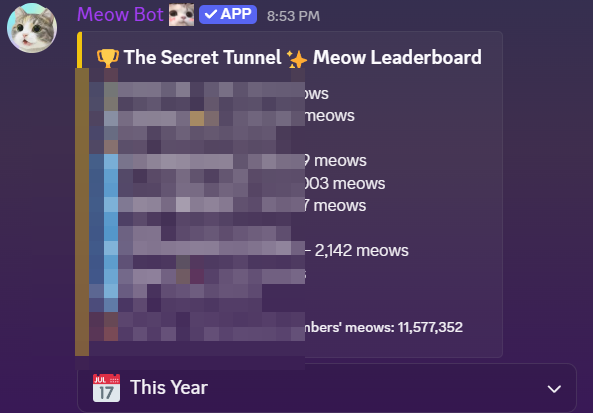
/meowboard — top 10 server meowers with time filter
💬 Anonymous Confessions
Let members post anonymous confessions to a dedicated channel. Useful for support communities, vent spaces, or just chaotic fun.
Confessions post as clean embeds with no name or avatar. Each one automatically opens a reply thread so the conversation can continue. If you set a mod log channel, your trusted moderators receive a private embed showing who sent each confession — without breaking anonymity for regular members.
Members can also reply anonymously inside a confession thread by running /confess from within the thread itself. Replies are numbered sequentially. Threads auto-lock after 100 replies to keep the main confessions channel from getting buried. If the bot loses permission to post in the confessions channel, the confession is delivered via DM to a server admin so nothing gets lost.
Create a confessions channel
Make a channel (e.g. #confessions) and give Meow Bot permission to send messages and create public threads in it.
Configure it
Run /config_confessions confess_channel:#confessions. Optionally add log_channel:#mod-logs for a private identity log only your trusted mods can see.
Members submit from anywhere
Any member can run /confess from any channel. A text modal appears, they type up to 2,000 characters, and it posts anonymously to your confessions channel.
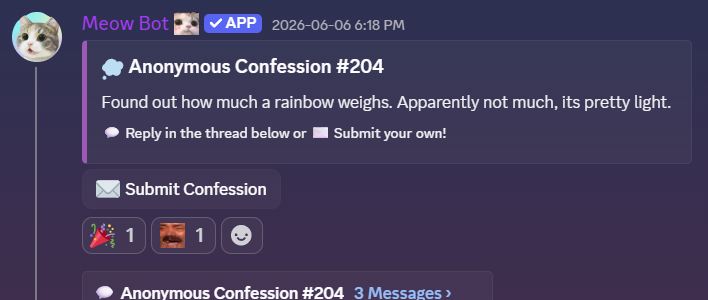
Confessions post as clean embeds — no name, no avatar
📊 Polls
Create timed polls with up to 10 options. Meow Bot enforces one vote per user and automatically closes the poll when the timer runs out.
Polls use emoji reactions for voting. If a member reacts with a second option, their first vote is automatically removed — no splitting votes or strategic multi-voting. Reactions that aren't part of the poll are removed immediately. Vote data persists even after the poll closes, so you can check results days later.
Create the poll
Run /poll and fill in the question, 2–10 options, and an optional duration (1–168 hours, default 24h). You can also attach an image.
Members react to vote
Meow Bot posts the poll embed with numbered emoji reactions. Members click to vote. Changing your vote is allowed — just react with a different option. Clicking the same reaction you already selected removes your vote entirely (toggle behaviour).
Check who voted (mods)
Run /pollvoters message_id:[id] for a per-option breakdown of voter display names. Works during and after the poll closes.
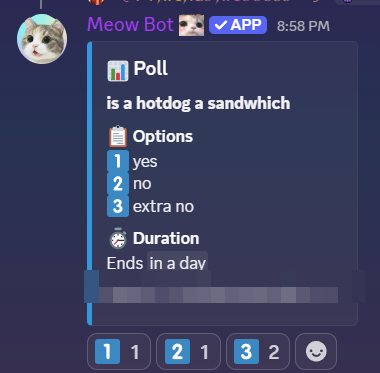
Poll embed — emoji reactions for voting, auto-closes when time runs out
🎭 Reaction Roles
Let members self-assign roles by clicking a reaction on a message. Supports whitelist gating — so only members with specific roles can unlock certain options.
Post the host message
Run /sendmessage "React below to pick your roles!" — Meow Bot posts that text as a message you'll configure as the reaction menu.
Select the message
Right-click the message → Copy Message ID. Then run /messageset [message_id] to select it for configuration.
Add emoji–role bindings
Run /addreaction 🎮 @Gamer to link an emoji to a role. Repeat for each role. Optionally gate with /addwhitelist 🎮 @VIP — only members with @VIP can claim the 🎮 role.
| Command | What it does |
|---|---|
/sendmessage | Post a message from the bot to use as a reaction role menu |
/messageset | Select a message by ID to configure reaction roles on it |
/addreaction | Link an emoji to a role on the selected message |
/removereaction | Remove an emoji–role binding |
/addwhitelist | Require a role before a reaction can grant another role |
/removewhitelist | Remove a whitelist requirement |
/listreactionroles | View all current emoji–role bindings for the selected message |
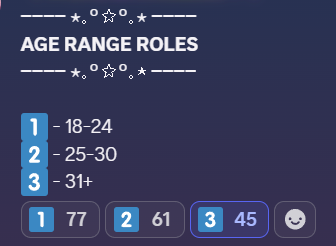
Reaction role menu — members click an emoji to self-assign a role
👋 Welcome Messages
Automatically greet new members when they join. Supports custom messages with placeholders for the member's mention and your server name.
Welcome messages are sent to your server's system channel. If no system channel is set, the bot finds the first channel where it has permission to send messages. A 2-second delay is built in to let Discord's audit log catch up — this also serialises rapid join bursts so raid events don't flood the channel.
| Command | What it does |
|---|---|
/config_welcome | Enable or disable welcome messages and set a custom message. Use {user} for the member mention and {server} for your server name. Example: /config_welcome enabled:True message:"Welcome to {server}, {user}! 🐾" |
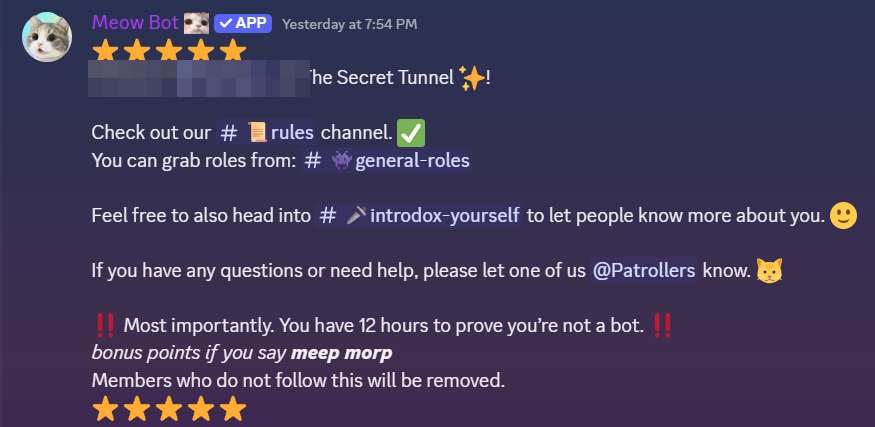
Custom welcome message with member mention and server name
📋 All Commands
All commands are Discord slash commands. Type / in any channel to browse them.
| Command | What it does |
|---|---|
/meow | Your meow count, rank, server total, and cat status label |
/barkcount | Your bark/woof count with a cat-themed scolding |
/meowboard | Server leaderboard — top 10 meowers with time filter |
/globalmeowboard | Global server leaderboard across all opted-in servers |
/confess | Submit an anonymous confession to the configured channel |
/poll | Create a timed poll with 2–10 options and an optional image |
/help | Full command list with descriptions |
| Command | Permission | What it does |
|---|---|---|
/setup | Manage Server | Interactive setup menu for all features with current settings displayed |
/config_welcome | Manage Server | Enable/disable welcome messages and set a custom message |
/config_confessions | Manage Server | Set the confession channel and optional mod log channel |
/config_meow_limits | Manage Server | Cap how many meows a single message can add (1–1000) |
/toggle_global_leaderboard | Manage Server | Opt into or out of the global leaderboard |
/pollvoters | Manage Messages | Per-option voter breakdown for any poll, live or closed |
/reset_server | Manage Server | Wipe all server data — requires typing CONFIRM |
/sendmessage | Manage Server | Post a bot message to use as a reaction role host |
/messageset | Manage Server | Select a message by ID to configure reaction roles on |
/addreaction | Manage Server | Link an emoji to a role on the selected message |
/removereaction | Manage Server | Remove an emoji–role binding |
/addwhitelist | Manage Server | Require a role before a reaction can grant another role |
/removewhitelist | Manage Server | Remove a whitelist requirement |
/listreactionroles | Manage Server | View all current emoji–role bindings |
❓ Frequently Asked Questions
Does Meow Bot count meows in every channel automatically?
Yes — it counts in any channel where it has View Channel and Read Message History permissions. To restrict counting to specific channels, remove those permissions from channels you want excluded in your server's channel settings.
Can it count meows from before I added the bot?
No. Meow Bot only counts messages it sees in real time. It doesn't scan message history, so counts start from the day the bot joined your server.
Are anonymous confessions truly private?
For regular members, yes — there's no name, avatar, or identifying info on the confession embed. If you configured a mod log channel, admins with access to that channel can see the submitter's display name and user ID. Without a log channel, nobody — including admins — can identify the person through the bot.
How do I get my server on the global leaderboard with a clickable invite?
First enable the global leaderboard with /toggle_global_leaderboard enabled:True. Then purchase a listing on the home page for $1.99/month. Your invite link will be added to both the website leaderboard and the /globalmeowboard command.
How do I remove Meow Bot from my server?
Go to your Discord server settings → Integrations → Bots and Apps → find Meow Bot → Kick. To delete your server's data first, run /reset_server confirm:CONFIRM before kicking the bot.
Start counting meows today 🐾
Free to add, no account required. Works in any Discord server.